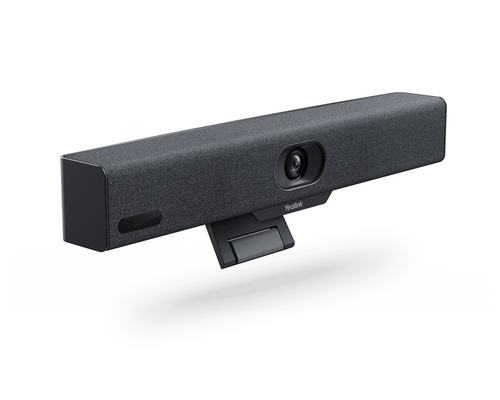
Highlights
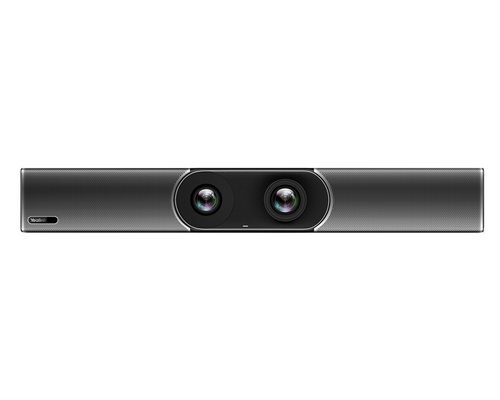
- Dual 48MP lenses with fixed-focus stitching provide up to 4K UHD video at up to 60 fps across a 110° horizontal field of view.
- IntelliFocus, auto framing, speaker tracking, Video Fence, people counting, picture-in-picture, and multi-focus framing help keep meeting participants visible and properly framed.
- An eight-MEMS microphone array and two stereo speakers provide integrated room audio with published microphone reach up to 6 meters.
- AI-enhanced noise cancellation, echo cancellation, audio fence, reverberation suppression, and full-duplex audio help manage common meeting-room sound challenges.
- The included CTP25 touch console provides dedicated room control and supports wired BYOD and screen sharing through USB-C.
- The appliance supports tabletop, wall-mount, and display-top installation, with two HDMI outputs and multiple USB, network, and audio connections for room integration.
Ideal For
- Medium conference rooms for approximately 7–12 participants
- Microsoft Teams Rooms on Android deployments
- Zoom Rooms appliance deployments
- Boardrooms and executive meeting spaces
- Rooms requiring wired BYOD and local content sharing
- Multi-location meeting-room standardization with centralized device management
Resources
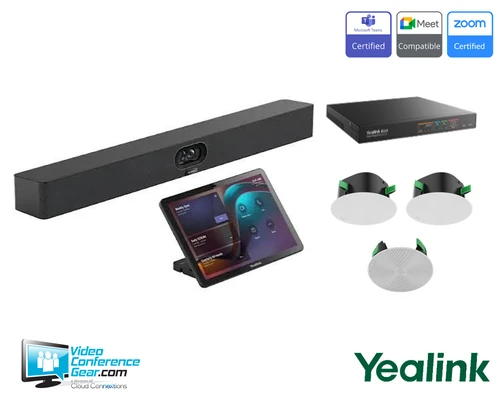
Yealink MeetingBar A40 with CTP25 for Microsoft Teams Rooms and Zoom Rooms
The Yealink MeetingBar A40 combines a dual-lens camera, integrated microphones and speakers, Android 13 compute, and room connectivity in one videobar for medium meeting rooms. With the included CTP25 touch console, it provides a dedicated control interface for Microsoft Teams Rooms on Android and Zoom Rooms deployments while supporting high-resolution video, content sharing, and wired BYOD.
This configuration is best suited to medium rooms with approximately 7–12 participants, including spaces around 4.5 m × 6 m. The A40 can be installed on a tabletop, wall, or display, and its audio system can be expanded with supported extension or ceiling microphones when the room requires additional coverage. Meeting-platform accounts and service licenses are separate requirements, and the exact firmware and regional configuration should be matched to the selected platform before deployment.
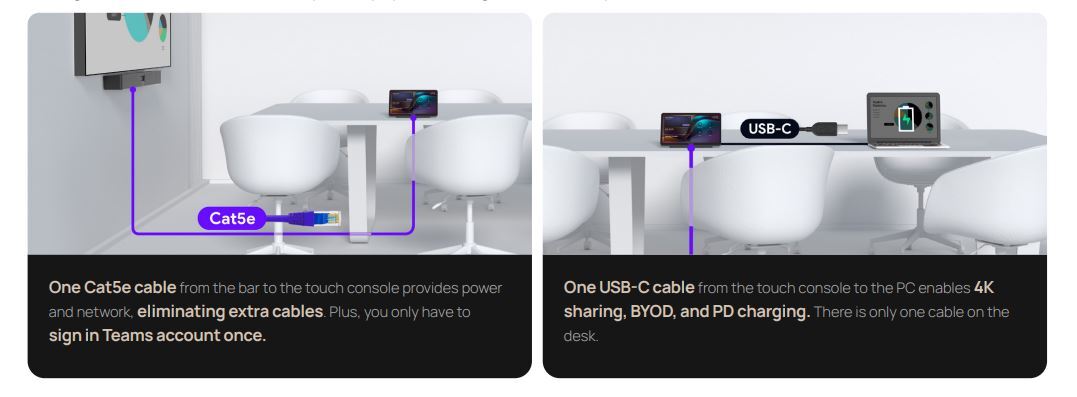
Simple and Easy Installation
Platform Compatibility
- Certification is firmware/version dependent; verify the installed firmware against Microsoft's current directory.
- Confirm regional configuration and current firmware before deployment.
- Wired USB-C deployment; direct A40 connection has cable-length limitations.
Key Specifications
- Camera system: Dual-lens fixed-focus stitched camera with two 48MP lenses.
- Video output: Up to 4K UHD at 60 fps; content sharing up to 4K at 15 fps in General Mode, with 1080p during Microsoft Teams meetings and 4K for local content sharing.
- Field of view: 110° horizontal; 120° diagonal field of view is also published.
- Digital zoom: 6x.
- Audio: Eight-MEMS microphone array and two stereo speakers; published microphone reach up to 6 meters.
- Audio processing: Full-duplex audio, AI-enhanced noise cancellation, echo cancellation, audio fence, and reverberation suppression.
- Integrated compute: Android 13 appliance.
- Connections: Ethernet, Wi-Fi 6, Bluetooth 5.0, 2 × HDMI-out, 2 × USB-C, 1 × USB-A 2.0, Yealink VCH RJ-45, 3.5 mm line-in/line-out, and power input.
- Display support: Two HDMI outputs; one or two external displays depending on deployment configuration.
- BYOD and sharing: Wired USB-C connection through the CTP25 to a user PC; direct USB-C connection to the A40 is also supported with cable-length limitations.
- Controller: Included Yealink CTP25 touch console with a 12.1-inch capacitive touchscreen.
- Mounting: Tabletop, wall mount, and TV-clip/display-top mounting; wall-mount and TV-clip hardware is included for the A40.
- A40 bar dimensions: 650 × 62 × 80 mm (W × D × H).
- Privacy and security: Electric privacy shutter, security lock slot, secure boot, hardware attestation, Microsoft PKI, and secure pairing.
- Operating temperature: 0–40°C.
What's Included
- Yealink MeetingBar A40 collaboration bar
- Yealink CTP25 touch console
- Power adapters
- Desktop stand
- Wall-mount bracket
- HDMI cables, network cable, and required bundle cabling
Compatibility
- Meeting and collaboration platforms: Microsoft lists the MeetingBar A40 and CTP25 as Teams Rooms on Android certified devices; Yealink also publishes a Zoom Rooms appliance configuration. Certification and supported features can depend on firmware and regional configuration.
- AV and room systems: The CTP25 can connect directly to the A40 through the A40 VCH port or connect over the same local network. The two HDMI outputs support one or two external displays depending on the deployment configuration.
- BYOD and content sharing: Connect a user PC to the CTP25 by USB-C for wired BYOD and screen sharing. A direct USB-C connection to the A40 is also supported, subject to cable-length limitations.
- Microphones and audio systems: Supports extension and ceiling microphones, including Yealink VCM35, VCM36, CS10, and CM20. When a CM20 is connected, the A40's built-in speaker is disabled.
- Network connectivity: Ethernet, Wi-Fi 6, and Bluetooth 5.0 are supported; the room must provide the network access and display equipment required by the selected deployment.
- Required room equipment: Provide compatible external displays as needed, network connectivity, and a Microsoft Teams Rooms or Zoom Rooms account and service license for the chosen platform.
Licensing, Warranty & Support
The hardware bundle does not include a meeting-service subscription. Your deployment requires the appropriate Microsoft Teams Rooms or Zoom Rooms account and service licensing, obtained separately according to the selected platform. Yealink Management Cloud Service, Microsoft Teams Admin Center, Microsoft Teams Rooms Portal Management Platform, and Zoom Device Management are documented management options; any applicable service requirements should be selected for the platform and management approach you plan to use. The A40-031 room configuration includes a documented 2-year hardware warranty. Coverage can vary by region and purchase channel, so we can help confirm the applicable warranty for your order. Yealink provides support resources, ticket submission, firmware resources, device-management services, and partner support programs. Displays, room furniture, network service, platform licensing, and any optional expansion microphones are separate unless specifically included in the order.
VideoConferenceGear.com Assistance
We can help validate whether the MeetingBar A40 and CTP25 are the right fit for your room, confirm the Teams Rooms or Zoom Rooms deployment, and select the displays, network approach, expansion microphones, and licensing you need. We can also coordinate installation, nationwide multi-location deployment, and ongoing support for your meeting-room environment.
Common Questions
Does the A40-031 bundle include the CTP25 touch controller?
Yes. A40-031 includes the Yealink CTP25 touch console along with its power adapter, the A40, mounting and stand hardware, and the documented cables. The CTP25 can connect directly to the A40 or over the same local network.
What room size is appropriate for the MeetingBar A40?
This bundle is intended for medium rooms serving approximately 7–12 people, with guidance covering rooms around 4.5 m × 6 m. Room acoustics, table layout, displays, and any need for expanded microphones should be considered during system design.
Does the system support Microsoft Teams Rooms and Zoom Rooms?
Yes. The MeetingBar A40 and CTP25 are listed as Teams Rooms on Android certified devices, and Yealink publishes a Zoom Rooms appliance configuration. The required platform account, service license, firmware, and regional configuration must match the deployment you plan to install.
Can I use the A40 for wired BYOD?
Yes. Connect the CTP25 to a user PC by USB-C for wired BYOD and screen sharing. A direct USB-C connection to the A40 is also supported, although cable length can affect that installation method.
Can external microphones or ceiling audio be added?
Yes. The A40 supports extension and ceiling microphones, including VCM35, VCM36, CS10, and CM20. If CM20 is connected, the A40's integrated speaker is disabled, so the room audio design should account for that configuration.
Product Videos
Custom Field
Product Reviews
Cloud Connextions Nationwide Services - Design, Installation & Support - A Partner You can Trust
Cloud Connextions specializes in delivering next-generation office technologies, including physical security, video conferencing, and ProAV solutions. As a valued partner for the design, integration, and support of these systems, we work with industry leaders like Verkada, Zoom, AVer, Crestron, Poly, and more. Our team ensures you receive top-quality products and seamless service. VideoConferenceGear.com is our trusted online source, where you’ll find rigorously tested products backed by our extensive expertise in creating customized technology solutions for modern office environments.